


TORRID
4.86.12K Reviews
App Specs
- Version
- 7.1.6
- Updated On
- License
- Free
- Downloads
- 1,000,000+
- Developer
- Torrid LLC
- Categories
- Shopping
- Platform
- Android, iOS
Screenshots
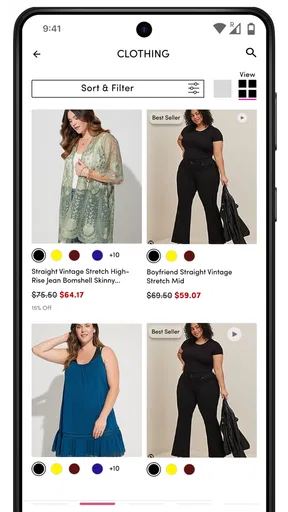

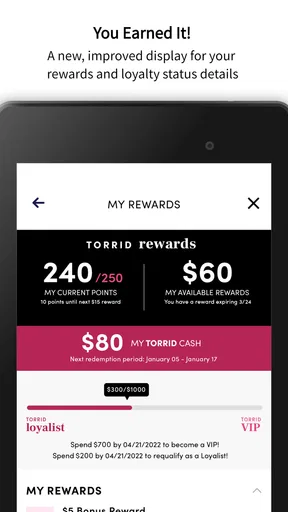
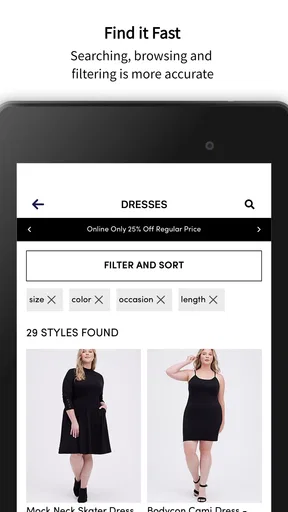
 Analysis by AppCompare
Shopping for plus-size fashion can be tiring when you have to search across several retailers just to find everyday clothes in a usable size range. TORRID focuses that experience in one place, with fashion aimed at curvy shoppers from sizes 10 through 30. I spent time using the app as a shopping tool rather than treating it as a simple catalog, and my overall impression is that it works best when I already know the kind of item I want and need a faster way to browse, compare, and save possibilities.
The app is free, made by Torrid LLC, and listed for everyone. It has built a sizable audience, with more than a million installs and an average rating of 4.8 from roughly 38 thousand ratings. Those figures suggest that it has become a familiar mobile option for Torrid customers, but popularity alone does not make a shopping app convenient. The useful question is whether it makes the process of choosing clothes easier than using a mobile browser or visiting a physical store.
How TORRID feels in everyday shopping
The strongest part of the experience is its clear focus. This is not a general marketplace where plus-size clothing is mixed into a much larger selection of unrelated products. The app is built around Torrid’s own clothing, accessories, and style direction, so browsing feels more intentional. If I am looking for a casual top, denim, a dress, or something for a particular occasion, I can stay within a store that already understands the fit range I am considering.
That focus also changes how I approach browsing. I do not have to begin by wondering whether a product will be offered in a size that works for me. The size range is central to the shopping experience, which removes one of the most frustrating parts of browsing mainstream fashion apps. It does not guarantee that every item will suit every body shape, of course, but it makes the initial search more relevant.
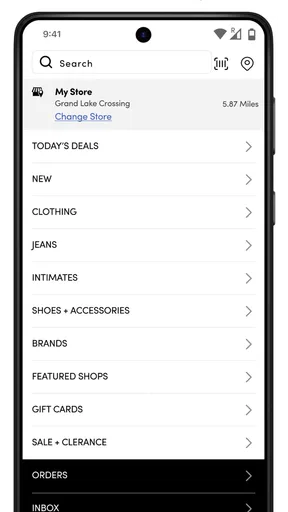
I found the app most useful on a phone when I had a short shopping window. For example, if I needed an outfit for a casual dinner after work, I could browse dresses or separates without opening several retailer sites. A practical workflow is to begin with the category, narrow the results by size and color, then inspect the product details before saving a few candidates. This is more efficient than scrolling through a broad feed and hoping the right item appears.
The app is best treated as a focused decision-making tool, not just a digital storefront. I use it to reduce the number of choices, check whether a style fits my current need, and return to items later. That approach makes the experience feel calmer than unstructured browsing, especially when I am shopping from a small screen.
Finding the right item without losing the thread
One small but important habit is to decide what matters most before opening the app. If the priority is a work outfit, I look for the category first and judge color, cut, and fabric afterward. If I am shopping for a seasonal refresh, I allow myself to browse more freely. This prevents the catalog from turning into an endless stream of attractive but impractical choices.
Worth Reading Before You Choose

EA SPORTS FC Mobile 26 Is a Bigger Football Game, but It Takes Time

Flipboard Shows What News Apps Must Do Beyond the Feed

Switching to Android Auto Means Rethinking Your Driving Routine

Google Calendar Makes a Crowded Week Easier to Manage

Ludo King Makes the Most of the Minutes Between Plans

Baby Panda World Brings Quick Play to Modern Phones, but Its Game Library Feels Busy
I also recommend checking the complete item information instead of relying on the main image. Clothing photos can make a garment look very different depending on styling, pose, and layering. The product page is where I would verify the available size, color, material details, and care information before making a decision. This is especially important when buying online because the app cannot replace trying something on.
A useful trade-off appears here: the app makes discovery easier, but it can also encourage impulse browsing. Fashion apps are designed to make another item feel tempting, and a focused retailer is no exception. I get better results when I save possible purchases and review them together later rather than buying the first item that catches my eye.
What the current version adds to the experience
The current version is 7.1.5, which places the app in a mature stage rather than an early experimental one. I would not interpret the version number as proof that every part of the shopping journey is perfect, but it does fit the impression of an established retail app that has had time to refine its basic structure. The app has been available since August 21, 2017, so existing users are likely to recognize it as part of a longer-running Torrid shopping routine rather than a newly launched experiment.
For me, the most meaningful sign of maturity is not a flashy visual change. It is whether the app helps me move smoothly between discovery and purchase. A retail app earns its place on my phone when I can open it with a clear purpose, find relevant products, examine the details, and return to a decision without starting over. The current release supports that general role, although the exact usefulness still depends on how much I already know about the item I want.
It is worth separating what I can observe from what I would merely hope to see in future updates. The current release confirms that the app remains actively presented as Torrid’s mobile shopping option. It does not give me a reason to assume that a future update will transform the experience, so I would judge it on what it does now: focused fashion browsing for curvy sizes, with the convenience of shopping from a phone.
How existing Torrid shoppers benefit
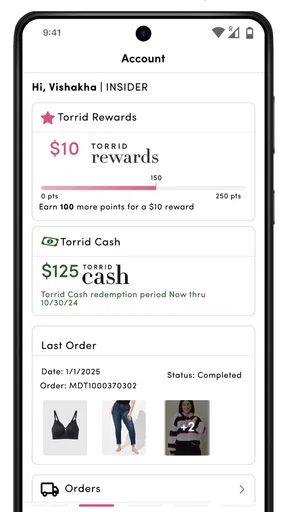
If I already shop with Torrid, the app is easier to justify than it is for someone who is only casually curious. It puts the retailer’s range into a format that is available while commuting, relaxing at home, or checking an item before visiting a store. I can use it to remember a style I saw earlier, compare several colors, or decide whether an online purchase is worth making without needing a desktop computer.
It can also help separate planned shopping from browsing in a physical location. In a store, I may be influenced by what is immediately on a rack or by how busy the fitting area is. On the app, I can take more time to compare related items. That does not make online shopping automatically better, but it gives me a different pace and can be useful when I want to think through an outfit.
Another practical use is preparing before a shopping trip. I can look through the available styles first, identify the silhouettes I like, and then enter a store with a clearer idea of what to look for. This is particularly helpful when I want to avoid wandering through every section. The app becomes a planning layer rather than a replacement for in-person shopping.
Existing users should still keep their personal fit knowledge in mind. A size range is not the same thing as consistent fit across every cut. A fitted top, stretch denim item, loose cardigan, and structured dress can all feel different even when the label shows the same size. I would use the app to narrow the field, then read each item’s details carefully instead of assuming that one successful purchase predicts every future purchase.
Where it compares well with other shopping options
Compared with a general marketplace app, TORRID is more focused on the needs of shoppers looking specifically for curvy fashion. A broad marketplace may offer more brands and a wider variety of products, but that variety can create extra filtering and more uncertainty about sizing. Torrid’s dedicated environment is less useful if I want to compare many unrelated labels, yet it is more efficient when I want to stay within Torrid’s own selection.
Compared with a mobile browser, the app feels more purposeful for repeat customers. A browser is perfectly adequate for a one-time visit, especially if I do not want another shopping app installed. The dedicated app becomes more attractive when I return often, browse from a phone regularly, or want a consistent place for Torrid shopping. Someone who rarely buys from the retailer may reasonably prefer the browser and avoid adding another app to their device.
Compared with physical shopping, the app wins on convenience and loses on touch and fit. I can shop at any time and review more styles without walking through a store, but I cannot feel the fabric or immediately judge how a garment sits on my body. For an item where drape, stretch, or structure is especially important, an in-person visit remains the better option when available.
The friction points I noticed
The app’s narrow focus is also its clearest limitation. It is not designed to help me compare Torrid with other retailers, so I still need another shopping method if I am deciding between brands or looking for the lowest possible price across stores. That is not a flaw in the sense of a broken feature; it is simply the consequence of using a single-brand shopping app.
Online clothing shopping also creates unavoidable uncertainty. Product images can communicate style, but they cannot fully answer how a fabric feels, how transparent a light color may be, or whether a particular cut will work for my proportions. I would be cautious about ordering several items without checking the relevant details first, because the convenience of mobile checkout does not remove the work of making a good fit decision.
Another limitation is that focused catalogs can still become visually overwhelming. Even when the selection is relevant, there may be many similar colors, cuts, and seasonal variations. I find it easier to shop with a specific purpose and a spending limit. Without those boundaries, the app can turn a quick search into a long session that produces more saved items than actual decisions.
People who dislike retailer-specific apps should also think about their habits. If I only shop occasionally, a browser may be enough. If I prefer to inspect clothing in person, the app may serve mainly as a preview tool rather than my primary store. The best choice depends less on technical interest and more on whether mobile Torrid shopping genuinely fits my routine.
Questions I would consider before installing it
One obvious question is whether the app costs anything to download. It is free, which makes trying it low-risk from a price standpoint. That does not mean shopping is free, naturally; the app is a retail channel, so the cost comes from the products I choose rather than from installing the software.
Another question is whether it is suitable for younger users. The listed content rating is Everyone, which reflects the app’s role as a standard fashion-shopping service. Parents should still apply their normal judgment around online purchases, but the app itself is presented for a general audience rather than an adults-only one.
Device compatibility is also worth checking before downloading. The app requires Android 8.0 or later, so anyone using an older Android phone may need to rely on a browser or a newer device. For supported phones, the current release is 7.1.5. iPhone shoppers can look for the iOS version through the appropriate official store, while Android users should confirm that their operating system meets the requirement.
Some readers may wonder whether the app is useful without already being loyal to Torrid. I think it can be, especially if the size range and style direction match what they are looking for. However, it is not the best starting point for someone who wants to explore the entire plus-size market. In that situation, a multi-brand retailer or comparison-focused shopping method offers broader discovery.
Finally, I would ask whether the app can replace trying clothing on. My answer is no. It can make selection more organized and help me shop when I cannot visit a store, but fit remains personal. I would use measurements, item details, and my experience with similar Torrid cuts to make a more informed choice, while accepting that online ordering has more uncertainty than an in-person fitting room.
What I would like to see from future updates
Since the app is already a long-running product, future improvements should focus on reducing hesitation rather than simply adding more visual polish. The most valuable direction would be clearer decision support around fit, fabric, and garment shape. When I am choosing between similar items, practical information helps more than another promotional image.
I would also watch how smoothly the app handles the transition from browsing to completing a purchase. Retail shopping often breaks down when a user has to repeat a search, rebuild a selection, or reconsider an item because the available size information is not immediately clear. A future update that makes those moments more transparent would have a real effect on confidence.
For current users, the sensible approach is to keep using the app for what it already does well: focused access to Torrid fashion in curvy sizes 10 through 30, convenient browsing, and mobile planning. I would not install it expecting a universal shopping solution. I would install it because I want Torrid’s catalog close at hand and prefer making clothing decisions from my phone.
After using it, I see TORRID as a practical companion for repeat shoppers and a useful introduction for anyone whose size needs align with the retailer. Its strengths come from focus, convenience, and a catalog built around a specific audience. Its weaknesses come from the same place: it cannot provide broad brand comparison, and it cannot reproduce the certainty of trying clothes on.
My recommendation is straightforward: if Torrid is already one of your preferred places to shop, the free app is worth having, particularly for planned browsing and quick checks between store visits. If you are looking for many brands, detailed cross-store comparisons, or a substitute for an in-person fitting, I would choose a broader shopping option instead. For the right shopper, though, TORRID makes a focused fashion search feel noticeably more manageable.
Pros
- Inclusive sizing makes many styles accessible to more shoppers.
- Frequent promotions can offer good value on clothing and accessories.
- Store locator helps find nearby Torrid locations and services.
- Wishlist features make it easy to save items for later.
- Product reviews can help compare fit
- quality
- and sizing before buying.
Cons
- Some popular sizes and colors may sell out quickly.
- Sale items can have stricter return or exchange conditions.
- Shipping costs may reduce the value of smaller orders.
- Fit can vary between different Torrid clothing collections.
- The app may require account details for a smoother shopping experience.
FAQs for TORRID
What is TORRID, and what can I use it for?
TORRID is designed for users who want a convenient way to browse and interact with Torrid’s fashion and shopping experience from a mobile device. After installing it, you can explore clothing, accessories, and other products, review item details, check available sizes and colors, and keep up with current promotions. It is particularly useful for shoppers who prefer browsing on Android or iOS rather than using a desktop browser.
Is the TORRID app free to download and use?
Yes, TORRID can generally be downloaded free of charge from the official Android or iOS app store. You do not normally pay simply to install or browse the application, although purchases made through the app cost money and may include applicable taxes, delivery charges, or other fees. Before completing an order, carefully review the final checkout total, shipping information, return conditions, and any promotional restrictions.
Do I need a TORRID account to browse or place an order?
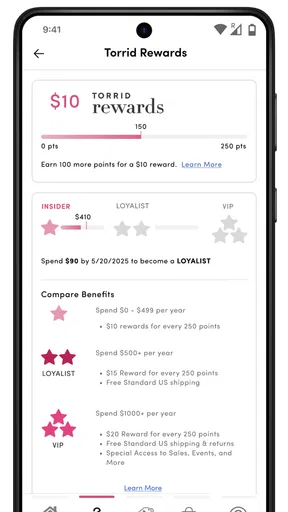
You can usually browse products and view much of the available content without creating an account. However, registering or signing in may make shopping more convenient because it can save delivery details, provide access to order history, support wishlist features, and simplify future checkouts. Some account-based benefits or loyalty features may also require you to remain signed in, so check the current terms within the app.
Can I find my size and check product availability in TORRID?
The app normally provides product descriptions, size options, color selections, pricing, and availability information on individual item pages. Even so, stock can change quickly, especially during sales or for popular sizes. Use the sizing information and measurements provided rather than relying only on a general size label. Availability may also differ between online inventory and physical stores, so verify the details before placing an order.
Is TORRID safe to use, and what should I check before downloading it?
For safer use, download TORRID only from the official Google Play Store or Apple App Store and confirm that the publisher matches the legitimate Torrid brand. Review the requested permissions, privacy policy, payment methods, and return information before making a purchase. Keep your device and app updated, use a strong password, and avoid entering account or payment details through links received from unknown messages or unofficial websites.


